rlaiola.github.io
timestylesheets.js
JavaScript implementation of Time Style Sheets (TSS)
| Introduction | Documentation | Usage | Examples | Credits | License |
Introduction
Time Style Sheets (TSS) is a set of document extensions that allow timing and synchronization of HTML elements within a Web page to be specified with CSS – a style sheet language conceived primarily for describing the look and formatting of a document. TSS specifications are declarative and follow the same CSS rules of cascade, specificity and inheritance. It builds on a subset of the Basic Synchronized Multimedia Integration Language (SMIL) timing model that defines when elements in a presentation get scheduled and, once scheduled, how long they will be active.
Timing properties are named after similar concepts that are already in use within the CSS3 Animations and Transitions. Although TSS timing properties and values are specified using the CSS syntax, they can also be read and modified via JavaScript. This provides a clean mechanism to add limited functionality to the existing CSS specification without major integration overhead. Besides the specification of an element’s temporal behavior, TSS also allows for playback control through CSS-like properties.
Timing Events extend current DOM events and follow the W3C DOM Level 2 standard model, which can be normally used within HTML elements. Alternatively, it is also possible to register/unregister event listeners on event target objects using the JavaScript methods addEventListener and removeEventLister, respectively. Complementary, TSS pseudo-classes can also be used to define specific presentation styles for different playback phases, in particular, when the playback cycle effectively starts (after timing-delay is computed) or ends.
Documentation
The documentation of the JavaScript library implementation can be found in the docs folder. In this section we provide an overview of the facilities provided by Time Style Sheets to encode temporal presentations on the Web. For more details, please refer to:
Rodrigo Laiola Guimarães, Dick Bulterman, Pablo Cesar, and Jack Jansen. 2014. Synchronizing Web Documents with Style. In Proceedings of the 20th Brazilian Symposium on Multimedia and the Web (WebMedia ‘14). ACM, New York, NY, USA, 151-158. DOI=10.1145/2664551.2664555 http://doi.acm.org/10.1145/2664551.2664555
Timing properties and values
TSS defines a set of timing properties and values within the CSS language as summarized below. Note: the default value is specified within parenthesis.
timing-container: Specifies how the presentation of the children elements will be scheduled. Available containers arepar-allel andseq-uential.- CSS Syntax:
timing-container: (par)|seq|initial; - JavaScript Syntax:
object.style.timingContainer = "seq";
- CSS Syntax:
timing-delay: Defines when an element will start. Its value is defined in seconds (s) or milliseconds (ms).- CSS Syntax:
timing-delay: time (0s)|initial; - JavaScript Syntax:
object.style.timingDelay = "2s";
- CSS Syntax:
timing-duration: Specifies how many seconds or milliseconds an element takes to complete one cycle.- CSS Syntax:
timing-duration: time (implicit|infinite)|initial; - JavaScript Syntax:
object.style.timingDuration = "1s";
- CSS Syntax:
timing-iteration-count: Defines how many times an element should be played.- CSS Syntax:
timing-iteration-count: number (1)|infinite|initial; - JavaScript Syntax:
object.style.timingIterationCount = "infinite";
- CSS Syntax:
timing-play-state: Specifies whether an element is running or paused. This property can be used in JavaScript to pause or resume an element’s playback in the middle of a cycle- CSS Syntax:
timing-play-state: (running)|paused|initial; - JavaScript Syntax:
object.style.timingPlayState = "paused";
- CSS Syntax:
timing-clip-begin: Specifies the time at which a continuous media stream begins playing, relative to the start of the media file. The value of this property must be specified in seconds (s) or milliseconds (ms).- CSS Syntax:
timing-clip-begin: time (0s)|initial; - JavaScript Syntax:
object.style.timingClipBegin = "10s";
- CSS Syntax:
timing-clip-end: Specifies the time at which a continuous media stream stops playing, relative to the start of the media file. The value of this property must be specified in seconds (s) or milliseconds (ms).- CSS Syntax:
timing-clip-end: time (implicit)|initial; - JavaScript Syntax:
object.style.timingClipEnd = "20s";
- CSS Syntax:
timing-volume: Defines the relative output of an audio object. It takes a value from 0.0 to 1.0. The default value is 1.0, which corresponds to 100%. A lower value makes the audio play more silently.- CSS Syntax:
timing-volume: number (1.0)|initial; - JavaScript Syntax:
object.style.timingVolume = "0.5";
- CSS Syntax:
timing-sync-master: Identifies which element (by its unique id) should be used as the master synchronization clock. By default an element follows its internal clock.- CSS Syntax:
timing-sync-master: #<object>; - JavaScript Syntax:
object.style.timingSyncMaster = "#video_quiz";
- CSS Syntax:
A description of property values follows.
initial: Sets a given property to its default value.infinite: Only applicable for the timing-iteration-count and timing-duration properties. Specifies that the element. should be played infinite times or one cycle will never end, respectively.number: A number that defines how many times a given property should be considered. Default value is 1.time: Defines the number of seconds or milliseconds. The default value is 0 for timing-delay. For the timing-duration property, it is infinite for static media (e.g. image) and implicit to continuous media.paused: Specifies that the element is paused.running: Default value. Specifies that the element is running.
Timing events and pseudo-classes
The Timing Events proposed in the Time Style Sheets specification are:
onbegin: The event occurs when the playback cycle of an element starts.onend: The event occurs when the playback cycle of an element ends.onplay: The event occurs when the playing state of an element changes to running.onpause: The event occurs when the playing state of an element changes to paused.ontimeupdate: The event occurs when the playback time changes.
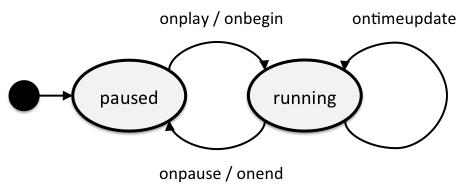
Timing Events can be normally used within HTML elements as shown below.
HTML Syntax: <element onbegin="SomeJavaScriptCode">
JavaScript Syntax: object.onbegin=function(){SomeJavaScriptCode};
In the TSS framework, 2 pseudo-classes have been defined to style an element’s presentation, as follows.
:active: style applied when the element’s playback cycle effectively starts (aftertiming-delayis computed).:not-active: style applied when the element’s playback cycle ends.
Timing pseudo-classes and associated styles can be specified in the stylesheet as usual.
selector:active { /* after computing delay */
  property: value;
}

selector:not-active { /* applied onend */
  property: value;
}
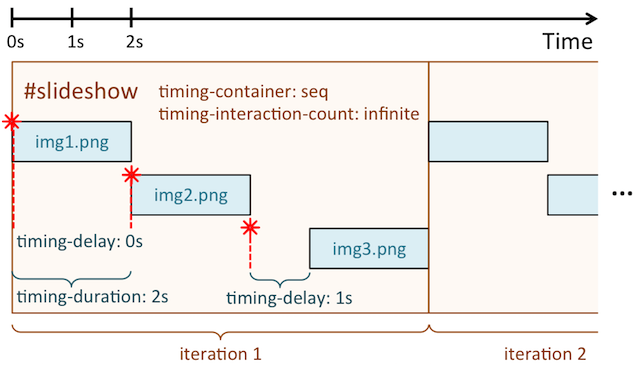
A simple example of integrating the TSS functionality to a Web document is given below. The <div> element named slideshow is defined to behave as a SMIL sequential container that will be played infinite times. The children elements, in this case the <img> elements, also have timing properties to control their temporal behavior. The presentation of an image will start immediately one after another, and each will last for 2 seconds. The exception is the last image, which will start with a 1-second delay as specified in the inline style. Note that timing properties can also be easily combined with existing CSS properties.
<div id="slideshow">
  <img src="img1.png" />
  <img src="img2.png" />
  <img src="img3.png" style="timing-delay:1s" />
</div>
<style>
  #slideshow {
    timing-container: seq;
    timing-interaction-count: infinite;
  }

  #slideshow img {
    timing-delay: 0s;
    timing-duration: 2s;
    border: 1px solid green;
  }

  #slideshow img:active {
    /* not necessary in this example */
  }

  #slideshow img:not-active {
    display: none;
  }
</style>

<script>
var slideshow = document.getElementById("slideshow");
slideshow.addEventListener("onbegin", function(ev){
  ev.stopPropagation();
  console.log("slideshow started!");
});
</script>
Usage
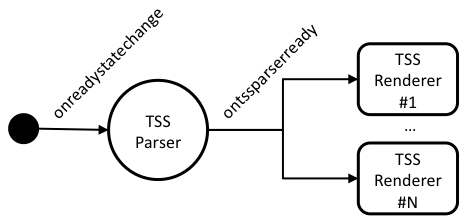
We developed a JavaScript TSS compliant agent composed of a parser that interprets a TSS definition and a renderer that implements the semantics specified in such document. Our implementation relies on JSCSSP, a CSS parser in JavaScript. To make use of our TSS proof of concept, an author just needs to download the JSCSSP library here and import the JavaScript files in the head of the HTML document, as follows:
<script type="text/javascript" src="cssParser.js"></script>
<script type="text/javascript" src="timestylesheets.js"></script>
Once the page is completely loaded by the browser, the TSS parser examines the associated styles and triggers a custom ontssparserready event. At this moment, a TSS renderer that listens to such event takes over and schedules the document presentation accordingly.
Examples
This repository contains basic code examples for the TSS parser and renderer to help you understand how to use this JavaScript implementation of Time Style Sheets.
Credits
The initial code was developed by Rodrigo Laiola Guimarães at IBM Research.